 Ilayantech
Custom Software vs Off-the-Shelf Software in 2027: How to Choose the Right One
If your way of working looks like everyone else's, buy something ready-made and get on with your day. If the way you work is what makes you different, or you spend more time bending a tool than using it, building starts to make sense. Plenty of businesses end up doing a bit of both.
The question of custom software vs off-the-shelf software comes up in almost every conversation we have with a growing business. As the year ends, many owners start planning their 2027 tools and budgets, and they ask: should we buy something that already exists, or have something built for us?
It sounds like a technical question. It almost never is. It's a question about how your business works, and how much of that you're willing to change to fit a product. So before you compare features and prices, it helps to be clear about what each option really is.
Custom software vs off-the-shelf software: what's the real difference?
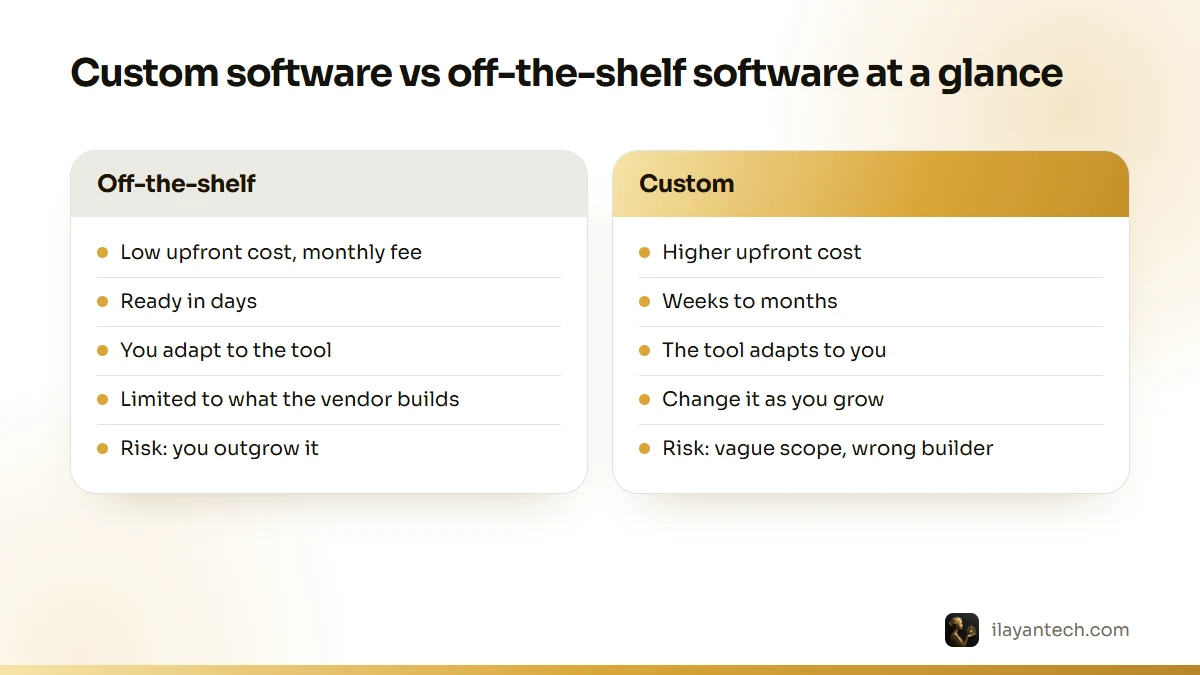
Off-the-shelf software is a ready-made product that many companies use. Accounting packages, CRMs and email tools are good examples. You sign up, set it up, and work the way the product expects you to.
Custom software is built for one business. It follows your process, your rules and your language, instead of asking you to adapt to a generic version.
The easiest comparison is clothing. A ready-made shirt costs less, you can wear it today, and for most people it fits well enough. A tailored one costs more and takes time, but it fits you exactly. Nobody argues that tailoring is always better. It's better when ready-made doesn't fit, or when the fit really matters.
Start with the problem, not the product
People often arrive with a solution already in mind ("we need an app") when the real problem is much smaller. Maybe invoices take a day to prepare. Maybe nobody knows how much stock is left in the second shop. Maybe three people keep the same customer list in three different places.
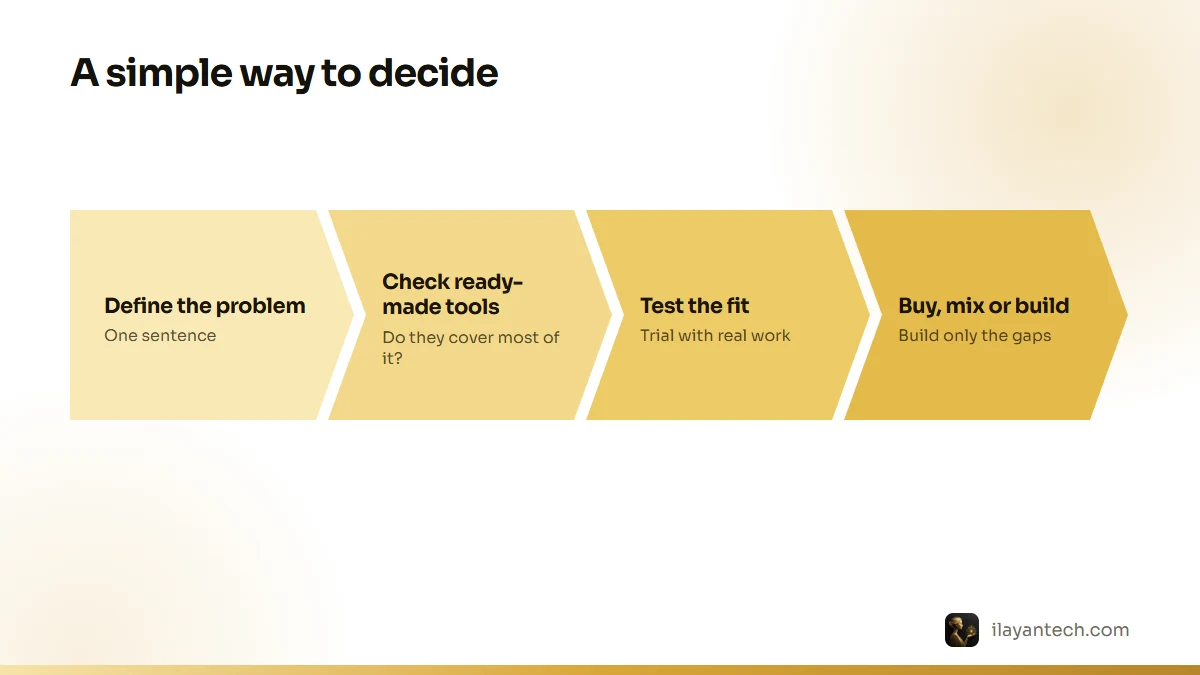
Write the problem down in one sentence. If you can't, you're not ready to choose either option yet, and that's fine. It's also the cheapest part of the whole process, and it makes every later conversation shorter.
What off-the-shelf software is good at
Ready-made tools are brilliant when your needs are ordinary. Accounting, email newsletters, basic project boards, simple CRMs: thousands of businesses have the same need, so someone has already built a polished answer. You sign up, click around for an afternoon, and you're working.
They also come with things you'd rarely build yourself: support teams, regular updates, security patches, and a community of users who've already hit the problems you're about to hit.
It's the right choice when you're not sure how your process should look yet, too. Starting with a tool that has opinions can save you from designing a system around habits you're about to drop anyway.
Where off-the-shelf software starts to hurt
The trouble rarely shows up in the first month. It shows up around the time you've hired your tenth person and the monthly bill has doubled. Or when you find that the one thing you really need sits behind a more expensive plan. Or when someone on your team builds a clever spreadsheet to fill a gap, and now the real system is half in the tool and half in a file only she understands.
These are the usual hidden costs:
- Per-user pricing that grows with every hire.
- Paid add-ons for features you assumed were included.
- Workarounds: the time people spend copying data between tools or doing things by hand because the software can't.
- Data in a box you don't control, which can make it hard to change tools later.
Those workarounds are the signal to watch for. One or two are normal. A pile of them means the tool and your business have stopped fitting. If that sounds familiar, our piece on the signs you've outgrown spreadsheets goes through the common ones.
When custom software makes sense
Custom software earns its keep in a few fairly specific situations:
- The way you do things is a real part of why customers choose you, and a generic tool would flatten it.
- Getting one job done means jumping between three or four tools.
- Per-user pricing is starting to punish you for growing.
- You need two systems to talk to each other and neither was built to.
- You have rules, approvals or calculations that no ready-made product handles properly.
Notice what's not on the list: "we want something unique." Wanting something unique is not a business case. Needing something that fits is.
You don't have to pick one
This is the part most comparisons skip. A very common and very sensible setup is to buy the standard pieces and build only the parts that are genuinely yours.
Picture a small chain of pharmacies. They use off-the-shelf accounting software, because accounting is accounting. But moving stock between branches, tracking expiry by batch and closing the day at each counter is where their daily pain is, so that's where they'd put custom effort. You keep the first investment small, and you find out exactly where building pays off.
Sometimes the best answer is even simpler: a ready-made product built for your exact kind of business. If you run several shops or clinics, a platform made for multi-branch work, like the multi-branch inventory and billing software we describe here, may cover most of what you need without a custom build at all.
What about no-code and low-code tools?
No-code platforms let you build simple apps by dragging and dropping, and they've become popular for internal tools and prototypes. They sit between the two options we've been talking about.
They're great for testing an idea cheaply, or for a small team's tool that nobody outside will use. They get harder when you need complicated rules, lots of users, tight security, or links to several other systems. Many teams use them to learn what they want, then build the real thing properly once they know.
The cost question, over several years
When people compare prices, they usually compare the first invoice. That's the wrong number. Look at what each option costs across three to five years.
For ready-made software, add up the subscription for the team you'll have then, not the team you have now, plus add-ons, plus the time lost to workarounds. For custom software, add the build, plus hosting, upkeep and the improvements you'll want. We break down what moves the price in our guide to custom software development cost.
The honest answer is that ready-made wins on small, simple needs, and custom often wins when the team grows or the process is unusual. The break-even point is different for every business, which is why guessing is so unreliable.
Questions worth asking yourself
Be honest with these, because nobody is marking you.
- Do most businesses in our field do this the same way we do?
- Does something that exists already cover most of what we need?
- Are we paying people to copy information from one place to another?
- Will the pricing hurt when the team doubles?
- Is this workflow part of what makes us different?
- Is there one person who can own the project and make decisions quickly?
If your answers lean towards the first two, buy. If they lean the other way, and there's someone to own it, building deserves a serious conversation. That last question matters more than it looks. Projects stall far more often because nobody can decide than because the technology is hard.
If you do build, start small
Don't try to build everything. Pick the single task that hurts most, build that, and put it in people's hands. You'll learn more from two weeks of real use than from two months of planning.
- Write a one-page brief: the problem, who uses it, what it connects to.
- Agree what "done" looks like for the first version.
- Make sure you own the code and the data, and get documentation at handover.
- Plan for after launch. Software needs hosting, updates and fixes.
- Get your team involved early. A tool people helped shape is a tool people use.
Our walkthrough of the web application development process shows what the steps look like, and these twelve questions will help you tell the careful builders from the rest.
Mistakes we see again and again
- Building too much at once. Big first versions take long, cost more and are often wrong.
- No single owner. Decisions by committee are slow, and the project drifts.
- Forgetting adoption. If nobody trains the team or asks for feedback, even good software gets ignored.
- Skipping the data export check when buying, then finding yourself stuck later.
- Choosing on the first price. The cheapest option rarely stays the cheapest.
So, which one is right for you?
If your process is ordinary and you need to start this week, buy. If your process is your edge, or you keep fighting your tools, build, starting small. If you're somewhere in the middle, which most businesses are, combine them. And if you're still unsure, talk to us. We'll tell you honestly which way we'd go, even when the answer is "buy something ready-made."
Frequently asked questions
Is custom software always more expensive than off-the-shelf software?
At the start, usually yes, because you are paying for something to be designed and built. But ready-made tools carry costs that creep in later: monthly fees that rise with every person you add, paid add-ons, and the hours your team loses to workarounds. Compare what each option costs over three to five years, not just the first invoice.
Can I start with a ready-made tool and move to custom later?
Yes, and it is a sensible way to do it. Use the ready-made tool to learn what your team actually needs, then build around the gaps. Just check that you can export your data before you commit, so the door stays open.
Is no-code or low-code a good middle option?
Often, for simple internal tools and quick prototypes. It starts to strain when you need complex rules, many users, strong security controls or connections to several systems. Think of it as a good way to test an idea before you decide whether to build properly.
How long does a custom build take?
A focused first version of one tool can be ready in weeks. Bigger systems take months. It is almost always better to release something small, let people use it, and improve it, than to wait for a perfect version of everything.
Who owns the code if someone builds it for me?
You should. Put it in writing before work starts, along with access to the source code and the documentation when the project is handed over.