 Ilayantech
AI in Business Software in 2027: Practical Use Cases (and What to Skip)
AI is best at dull, repetitive reading and writing jobs, with a person checking the result. It is a poor fit where a simple rule already works, or where a mistake would be costly and hard to spot. Start with one real problem, measure it, and keep a human in the loop.
Heading into 2027, nearly every piece of software has an "AI" badge somewhere on it. Some of it is genuinely useful. A lot of it is a chatbot bolted onto a screen because it makes a good headline.
We build software for a living, so here's our honest take on AI in business software: use it where it quietly solves a specific, boring problem, and leave it out everywhere else. The rest of this piece is about how to tell which is which.
What AI in business software really means
Strip away the marketing and most AI features do one of a few things. They read and understand text or images. They write something. They spot patterns in data. Or they sort things into groups. That's it. They're useful building blocks, not magic.
The key question isn't "does it use AI?" It's "does it save a real person real time, and can we trust the result?"
Where AI in business software genuinely helps
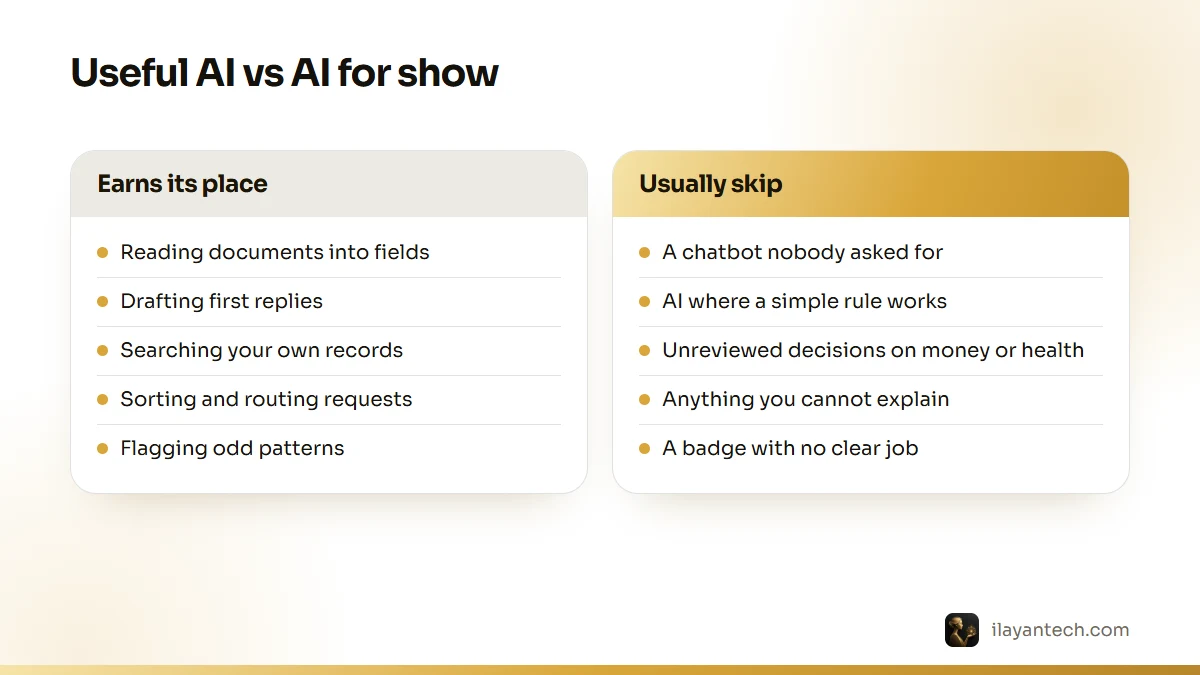
Reading documents and pulling out the details. Turning a photographed invoice, a form or a long email into neat fields saves a lot of typing. Someone still checks it, but the heavy lifting is done.
Writing first drafts. A suggested reply to a common customer question, a product description, a summary of long notes. The draft saves ten minutes, and a person edits it before it goes anywhere.
Searching your own records. "Show me everything about this customer" or "what went wrong last month?" is much quicker than clicking through five screens.
Sorting and routing. Tagging support requests, flagging the urgent ones, sending things to the right person. It cuts delays without anyone making an important decision.
Noticing odd things. An unusual sales figure, a sudden drop in stock, a strange transaction. The software points, a human looks.
Suggesting, not deciding. Reorder suggestions based on past sales are a good example. The software proposes, a person approves.
AI use cases by part of the business
| Area | Sensible use | Keep a human for |
|---|---|---|
| Customer support | Draft replies, sort and tag requests | Sensitive complaints, refunds |
| Finance and billing | Read invoices, flag unusual entries | Approvals and payments |
| Inventory and operations | Reorder suggestions, spotting stock oddities | Final purchasing decisions |
| Sales | Summarise customer history, draft follow-ups | Pricing and relationships |
| Healthcare | Search records, summarise notes | Every clinical decision |
What this looks like in real businesses
It helps to picture the dull, everyday ways AI might show up:
- A pharmacy photographs a supplier invoice and the software fills in items, batches and expiry dates for someone to confirm.
- A clinic searches patient records in plain words, such as "last visit for knee pain," instead of opening files one by one.
- A shop gets a suggested reorder list based on what sold over the past weeks, which the manager adjusts and approves.
- A service business sees incoming messages sorted into "urgent," "billing" and "general," with a draft reply ready to edit.
None of these is flashy. All of them save real time, and all of them keep a person in charge.
What to skip
A chatbot nobody asked for. If customers aren't struggling to find answers, a chatbot adds cost and a fresh place for mistakes.
AI where a simple rule would do. "Alert me when stock drops below ten" needs a rule, not a model.
Automatic decisions about money, health or legal matters without someone reviewing them. Mistakes there are expensive and hard to spot.
Anything you can't explain to your team or your customers. If nobody can say why the system did something, trust won't last long.
A five-step test before you invest
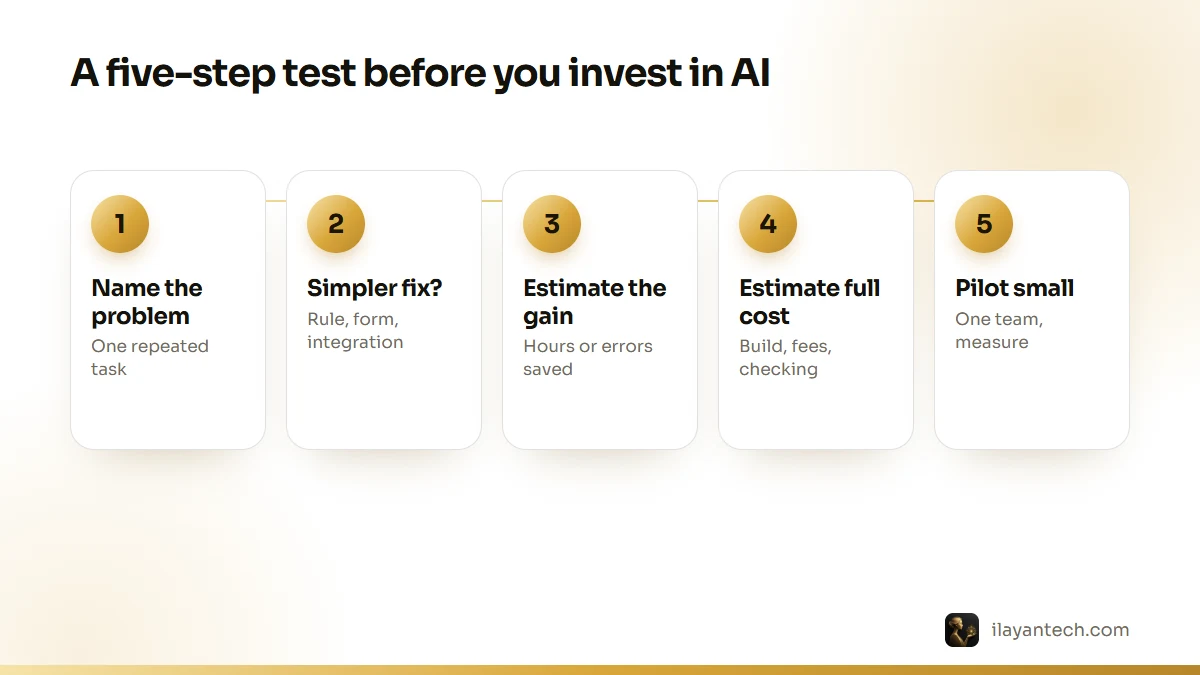
- Name the problem. Which specific, repeated task is costing time today?
- Look for a simpler fix. Could a rule, a form or better connections between tools solve it?
- Estimate the gain. How many hours or mistakes would it save each month?
- Estimate the full cost. Building it, the per-use fees, and the effort of checking its output.
- Try it small. Run it with one team and measure before rolling it out.
The real costs of AI features
People often budget for building the feature and forget the rest. There are usually three parts:
- Building it, including connecting it to your data.
- Running it. Many AI services charge per use, so cost grows as volume grows.
- Checking it. Someone has to review results, handle mistakes and keep it working as things change.
It's worth working out the cost per use before you commit, the same way you'd think about the rest of your software budget. Our guide to custom software development cost covers how to think about running costs and upkeep.
Data and privacy: the questions to ask
- Where is our data stored, and who can see it?
- Is our data used to train models?
- How do we review and correct what the AI produces?
- What happens when it's wrong?
- What does it cost per use as volume grows?
They're good questions for any software partner, which is why several of them show up in our guide to choosing a software development company.
Fix the basics first
When people ask us about AI, the real problem is often disconnected tools and too much manual typing. Fixing that usually delivers more than any AI feature, and it's far cheaper. Our piece on custom software vs off-the-shelf software can help you decide how to go about it. AI can come later, once it has somewhere useful to be.
Myths worth ignoring
"AI will do everything automatically." The useful systems we see do small jobs and ask a person to confirm.
"More AI means better software." Not at all. A feature that doesn't solve a real problem makes software slower, costlier and harder to trust.
"We're behind if we don't add AI now." You're only behind if you have a problem it could solve and aren't solving it. Fixing the basics first is a perfectly good strategy.
"It's always cheap." Building and running it costs money, and usage fees grow with volume. Work out the numbers first.
Habits that keep AI honest
- Show people what the AI produced and let them edit before anything is sent or saved.
- Keep a record of what the system suggested and what a person decided.
- Review a sample of results regularly, so you notice if quality slips.
- Make it easy to switch the feature off if it isn't helping.
How we approach it
When we build products like ProjectRD, our rule is simple: we won't add a chatbot nobody asked for to chase a headline. When AI makes it into a product, it should quietly solve a specific, unglamorous problem, and earn its place. That's a good rule for anyone choosing software, too.
Take extra care in sensitive settings
In healthcare or finance, a person should stay responsible for every decision, access to data should be limited, and there should be a record of what the system did. We touch on this in our article on clinic management software features.
Thinking about AI for your product or workflow? Tell us the problem, and we'll tell you honestly whether AI is the right tool for it.
Frequently asked questions
Does a small business need AI in its software?
Not by default. Most businesses get more value from the basics first, like connecting their tools and removing manual typing. Add AI when you have a specific, repetitive problem it can help with, and you can measure the difference.
Is it safe to put business data into AI tools?
It depends on the tool and its terms. Ask where the data is stored, whether it is used to train models, who can see it, and what control you have. Don't send sensitive information to anything you haven't looked into.
How much does it cost to add AI features?
There is the cost of building the feature, plus ongoing usage fees for the AI service, plus the effort of checking the results. The usage fees grow with volume, so work out the cost per use before you commit.
Will AI replace my staff?
The useful versions we see take away tedious bits, like typing data in or drafting a first reply, so people can spend time on work that needs judgment and a human touch.
What is the first AI feature a business should try?
Usually something small and low-risk, like drafting replies to common questions or pulling details out of documents, where a person reviews every result. It teaches you a lot for little cost.